

Modded PS3 Slim – 2TB HDD + 250GB | PSP, PS1, PS2 PS3 & Retro Games | Plug & Play
$579.99
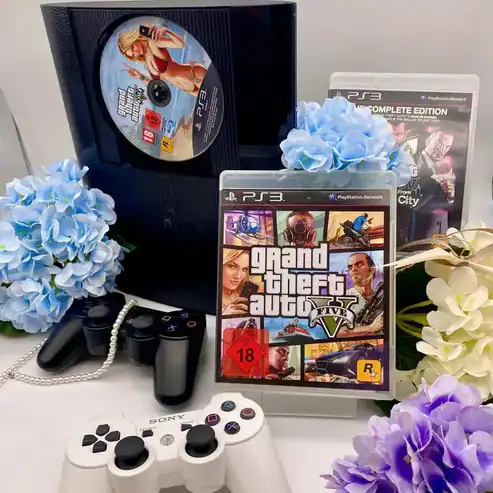
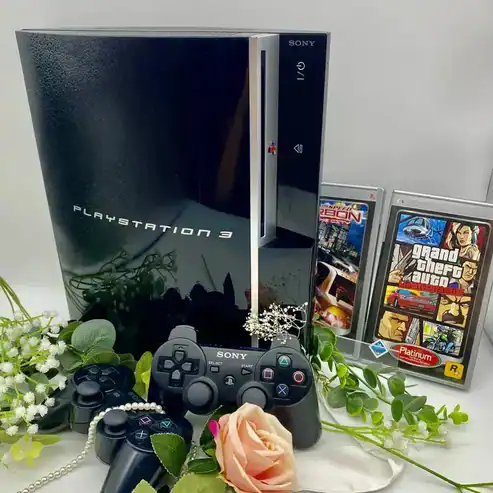
Our professionally modded PS3 Slim console delivers a premium all-in-one retro gaming experience. Preloaded with a carefully curated collection of PSP, PS1, PS2, PS3, and retro games, it’s ready to play straight out of the box — no setup required.
The system includes a 250GB internal drive plus a 2TB external HDD, giving you massive storage for hundreds of classics. Everything you need to start gaming is included in the box.
✅ Key Features:
✔️ Modded PS3 Slim – cleaned, tested & fully functional
✔️ 250GB internal + 2TB external HDD – huge storage for games
✔️ Preloaded with PSP, PS1, PS2, PS3 & retro titles
✔️ Plug and play setup – no downloads or configuration needed
✔️ Includes everything required for gaming out of the box
✔️ Perfect for collectors, retro enthusiasts, or anyone looking to expand their PS3 experience

Description
Our professionally modded PS3 Slim console delivers a premium all-in-one retro gaming experience. Preloaded with a carefully curated collection of PSP, PS1, PS2, PS3, and retro games, it’s ready to play straight out of the box — no setup required.
The system includes a 250GB internal drive plus a 2TB external HDD, giving you massive storage for hundreds of classics. Everything you need to start gaming is included in the box.
✅ Key Features:
✔️ Modded PS3 Slim – cleaned, tested & fully functional
✔️ 250GB internal + 2TB external HDD – huge storage for games
✔️ Preloaded with PSP, PS1, PS2, PS3 & retro titles
✔️ Plug and play setup – no downloads or configuration needed
✔️ Includes everything required for gaming out of the box
✔️ Perfect for collectors, retro enthusiasts, or anyone looking to expand their PS3 experience
Q & A
Q & A
 Modded PS3 Slim – 2TB HDD + 250GB | PSP, PS1, PS2 PS3 & Retro Games | Plug & Play
Reviews (2)
2 reviews for Modded PS3 Slim – 2TB HDD + 250GB | PSP, PS1, PS2 PS3 & Retro Games | Plug & Play
Modded PS3 Slim – 2TB HDD + 250GB | PSP, PS1, PS2 PS3 & Retro Games | Plug & Play
Related products


Definitely fun. Some of the games came with only one disc installed when the game requested had more than one disc. Super Nintendo section had zero roms. I’m happy with the purchase. What works, works very well. The fan was turned off by default. That caused some early panic with over heating, but the OS allows you to choose the setting. A little trouble shooting is to be expected. The hardware works great, and is in great cosmetic condition.
How to Make Missing Retro (SNES, etc.) Games Appear on RetroArch (Watch this too):
https://vimeo.com/1156585762/6bac9e115d
———–
Instructions again below if needed:
Your instructions for your PS3 Slim/Super Slim – Hen Console is here if you need it:
Full PS3 Slim/Super Slim Hen Console Tutorial (Watching whole video is high recommended):
https://vimeo.com/1156585841/46897e770f
How to Make Missing Retro (SNES, etc.) Games Appear on RetroArch (Watch this too):
https://vimeo.com/1156585762/6bac9e115d
These videos are already in the Full Video Tutorial. They are just separated to make it easier to access the specific section:
How to Download PS3 File Directly to your PS3 (PJGi app) via you PS3:
https://vimeo.com/1156585785/b443df1998
How to Use RetroArch
https://vimeo.com/1156585921/c310c62563
Extras:
How to activate your PS3 offline via Apollo Tools (Mainly to allow PS2 Classics to play) – Your console already has this on, so you won’t need to do this:
https://vimeo.com/1156585976/1f104b3aef
Please note downloading PS2/PS1 titles directly are not possible right now due to the homebrew creator no longer providing support for it.
Only PS3 titles can be downloaded directly via PKGi.
All the best,
-Simon
-RedProClub.com
The product is functioning perfectly. I initially panicked when I thought the PS3 was faulty, but Simon explained the issue and resolved it for me. I’m very happy with this purchase.